Firefox - Dealing With Brightness While Surfing!
Posted: 26 Dec 2009, 11:07
My room isn't the brightest as I like to keep it kind of dim, so while on the net it can be headache producing because of all the websites that are white and the loading pages in Firefox.
So I thought I would share some of the things I use to get around all the brightness.
Stylish - <!-- m -->https://addons.mozilla.org/en-US/firefox/addon/2108<!-- m -->
This addon lets you use different layouts, color schemes, etc for popular sites, or create your own. There is a library full of Styles for tons of sites.
Styles I Use:
Google - <!-- m -->http://userstyles.org/styles/1693<!-- m -->

Wikipedia - <!-- m -->http://userstyles.org/styles/4325<!-- m -->
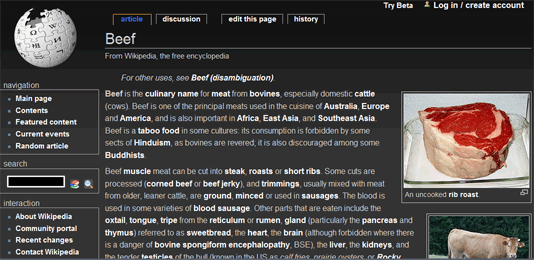
YouTube - <!-- m -->http://userstyles.org/styles/1078<!-- m --> (my favorite)

White Background Zapper:
This will create a button in your bookmarks toolbar, when clicked it will recolor all the white on a page to a beige color.
In your Bookmarks Toolbar; Right click and press "New Bookmark". Erase the name so it will just be an icon, or give it a name if you want. For location copy and paste this into it and press Add.
Remove the white color that is seen before pages load. (really helpful if you open a lot of new pages with the middle mouse button)
Click start, copy & paste this into search and hit enter: %AppData%\Mozilla\Firefox\Profiles\
Open the folder shown, it should be named something similar to this "pdkqknl4.default"
Next open the Chrome Folder. You should see two files names "userContent-example" Select either one, rename and erase "-example". Open that file up, erase all the text inside.
Copy and paste this into it browser { background-color: #000 !important; }
save and restart Firefox.
/end-nerd-lecture
So I thought I would share some of the things I use to get around all the brightness.
Stylish - <!-- m -->https://addons.mozilla.org/en-US/firefox/addon/2108<!-- m -->
This addon lets you use different layouts, color schemes, etc for popular sites, or create your own. There is a library full of Styles for tons of sites.
Styles I Use:
Google - <!-- m -->http://userstyles.org/styles/1693<!-- m -->
Wikipedia - <!-- m -->http://userstyles.org/styles/4325<!-- m -->
YouTube - <!-- m -->http://userstyles.org/styles/1078<!-- m --> (my favorite)
White Background Zapper:
This will create a button in your bookmarks toolbar, when clicked it will recolor all the white on a page to a beige color.
In your Bookmarks Toolbar; Right click and press "New Bookmark". Erase the name so it will just be an icon, or give it a name if you want. For location copy and paste this into it and press Add.
javascript:(function(){function%20getRGBColor(node,prop){var%20rgb=getComputedStyle(node,null).getPropertyValue(prop);var%20r,g,b;if(/rgb\((\d+),\s(\d+),\s(\d+)\)/.exec(rgb)){r=parseInt(RegExp.$1,10);g=parseInt(RegExp.$2,10);b=parseInt(RegExp.$3,10);return[r/255,g/255,b/255];}return%20rgb;}%20R(document.documentElement);%20function%20R(n){var%20i,x,color;if(n.nodeType==Node.ELEMENT_NODE%20&&%20n.tagName.toLowerCase()!="input"%20&&%20n.tagName.toLowerCase()!="select"%20&&%20n.tagName.toLowerCase!="textarea"){for(i=0;x=n.childNodes;++i)R(x);%20color=getRGBColor(n,"background-color");if(%20(typeof(color)!="string"%20&&%20color[0]%20+%20color[1]%20+%20color[2]%20>=%202.8)%20||%20(n==document.documentElement%20&&%20color=="transparent"))%20{%20n.style.backgroundColor%20=%20"tan";/*Moz%201.0*/%20n.style.setProperty("background-color",%20"tan",%20"important");/*Moz%201.4%20after%20zap%20colors*/%20}%20}}})()
Remove the white color that is seen before pages load. (really helpful if you open a lot of new pages with the middle mouse button)
Click start, copy & paste this into search and hit enter: %AppData%\Mozilla\Firefox\Profiles\
Open the folder shown, it should be named something similar to this "pdkqknl4.default"
Next open the Chrome Folder. You should see two files names "userContent-example" Select either one, rename and erase "-example". Open that file up, erase all the text inside.
Copy and paste this into it browser { background-color: #000 !important; }
save and restart Firefox.
/end-nerd-lecture
