
So I thought I would share some of the things I use to get around all the brightness.
Stylish - <!-- m -->https://addons.mozilla.org/en-US/firefox/addon/2108<!-- m -->
This addon lets you use different layouts, color schemes, etc for popular sites, or create your own. There is a library full of Styles for tons of sites.
Styles I Use:
Google - <!-- m -->http://userstyles.org/styles/1693<!-- m -->

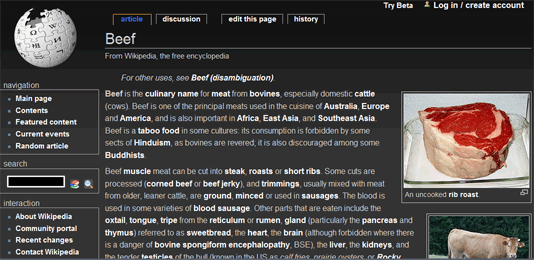
Wikipedia - <!-- m -->http://userstyles.org/styles/4325<!-- m -->
YouTube - <!-- m -->http://userstyles.org/styles/1078<!-- m --> (my favorite)

White Background Zapper:
This will create a button in your bookmarks toolbar, when clicked it will recolor all the white on a page to a beige color.
In your Bookmarks Toolbar; Right click and press "New Bookmark". Erase the name so it will just be an icon, or give it a name if you want. For location copy and paste this into it and press Add.
javascript:(function(){function%20getRGBColor(node,prop){var%20rgb=getComputedStyle(node,null).getPropertyValue(prop);var%20r,g,b;if(/rgb\((\d+),\s(\d+),\s(\d+)\)/.exec(rgb)){r=parseInt(RegExp.$1,10);g=parseInt(RegExp.$2,10);b=parseInt(RegExp.$3,10);return[r/255,g/255,b/255];}return%20rgb;}%20R(document.documentElement);%20function%20R(n){var%20i,x,color;if(n.nodeType==Node.ELEMENT_NODE%20&&%20n.tagName.toLowerCase()!="input"%20&&%20n.tagName.toLowerCase()!="select"%20&&%20n.tagName.toLowerCase!="textarea"){for(i=0;x=n.childNodes;++i)R(x);%20color=getRGBColor(n,"background-color");if(%20(typeof(color)!="string"%20&&%20color[0]%20+%20color[1]%20+%20color[2]%20>=%202.8)%20||%20(n==document.documentElement%20&&%20color=="transparent"))%20{%20n.style.backgroundColor%20=%20"tan";/*Moz%201.0*/%20n.style.setProperty("background-color",%20"tan",%20"important");/*Moz%201.4%20after%20zap%20colors*/%20}%20}}})()
Remove the white color that is seen before pages load. (really helpful if you open a lot of new pages with the middle mouse button)
Click start, copy & paste this into search and hit enter: %AppData%\Mozilla\Firefox\Profiles\
Open the folder shown, it should be named something similar to this "pdkqknl4.default"
Next open the Chrome Folder. You should see two files names "userContent-example" Select either one, rename and erase "-example". Open that file up, erase all the text inside.
Copy and paste this into it browser { background-color: #000 !important; }
save and restart Firefox.
/end-nerd-lecture